I don’t mean in general, like “turn off your phone and disconnect” or “get back to nature”. I mean, really, who actually does that? Not me. I even have a little waterproof case so I can take my phone to the pool, or the beach.
Disconnect your cancelled apps from QuickBooks Online
That is what I’m talking about.

You need to remember to disconnect any add-ons you’ve signed up for via apps.com – then cancelled, for whatever reason.
Why do I need to this, you ask?
Just because you’ve cancelled the account with the app… doesn’t mean they can’t (or won’t) read all of your data in QuickBooks Online.

I’m the last person to really make a big deal about this sort of stuff. I’m definitely concerned about security and privacy, but I’m not losing sleep over the fact that Google probably knows intimate details about me than my husband.
I just think it’s one of those best practices that rarely gets mentioned, because many of us think it’s just something everyone would know to do – and I realized as I was leaving the ASBDC conference last week, that I’ve NEVER TALKED ABOUT IT IN ANY APP SESSION I’VE PRESENTED.
For this, I apologize to all of you that are reading this and have been in any of these sessions.
Don’t get me wrong – I have no idea if this has happened. I have no proof of any apps that have done, or continue to do this.
What I do know is that unless you login in to QBO, and then head over to your left nav bar…
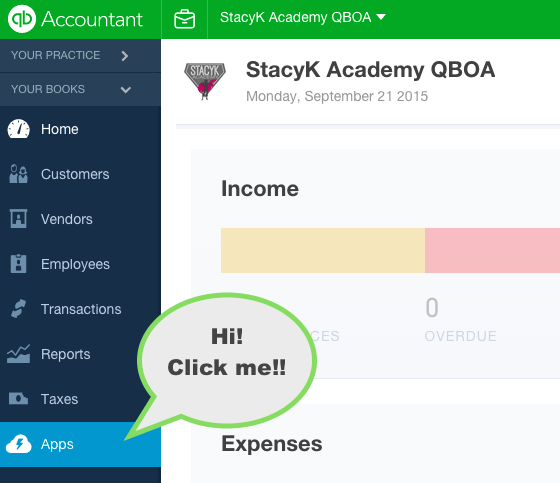
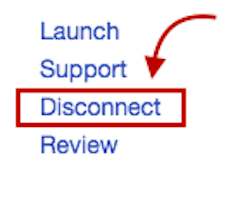
…Then go to “My Apps”, find the app you’ve cancelled, and click “Disconnect”:
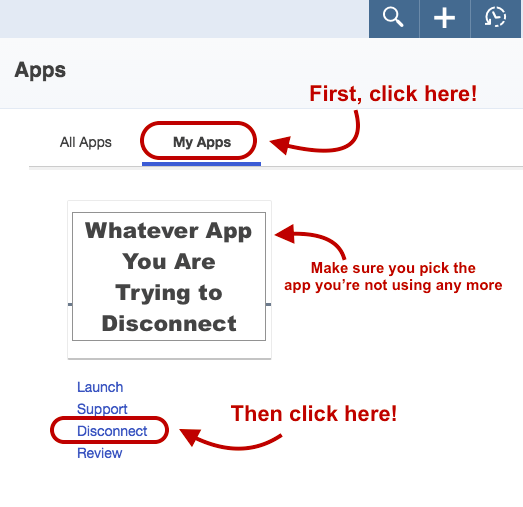
If you don’t do disconnect… Any apps that you connected, but have otherwise cancelled directly via their website, will still have access to read your data.
So yeah, always remember to disconnect your cancelled apps from QuickBooks Online, okay peeps?